Statewright Review: Visual State Machines that Bring Reliability to AI Agents
Statewright offers a visual, code‑first approach to building AI agents as state machines, turning chaotic LLM behavior into reliable, testable flows for developers and founders.
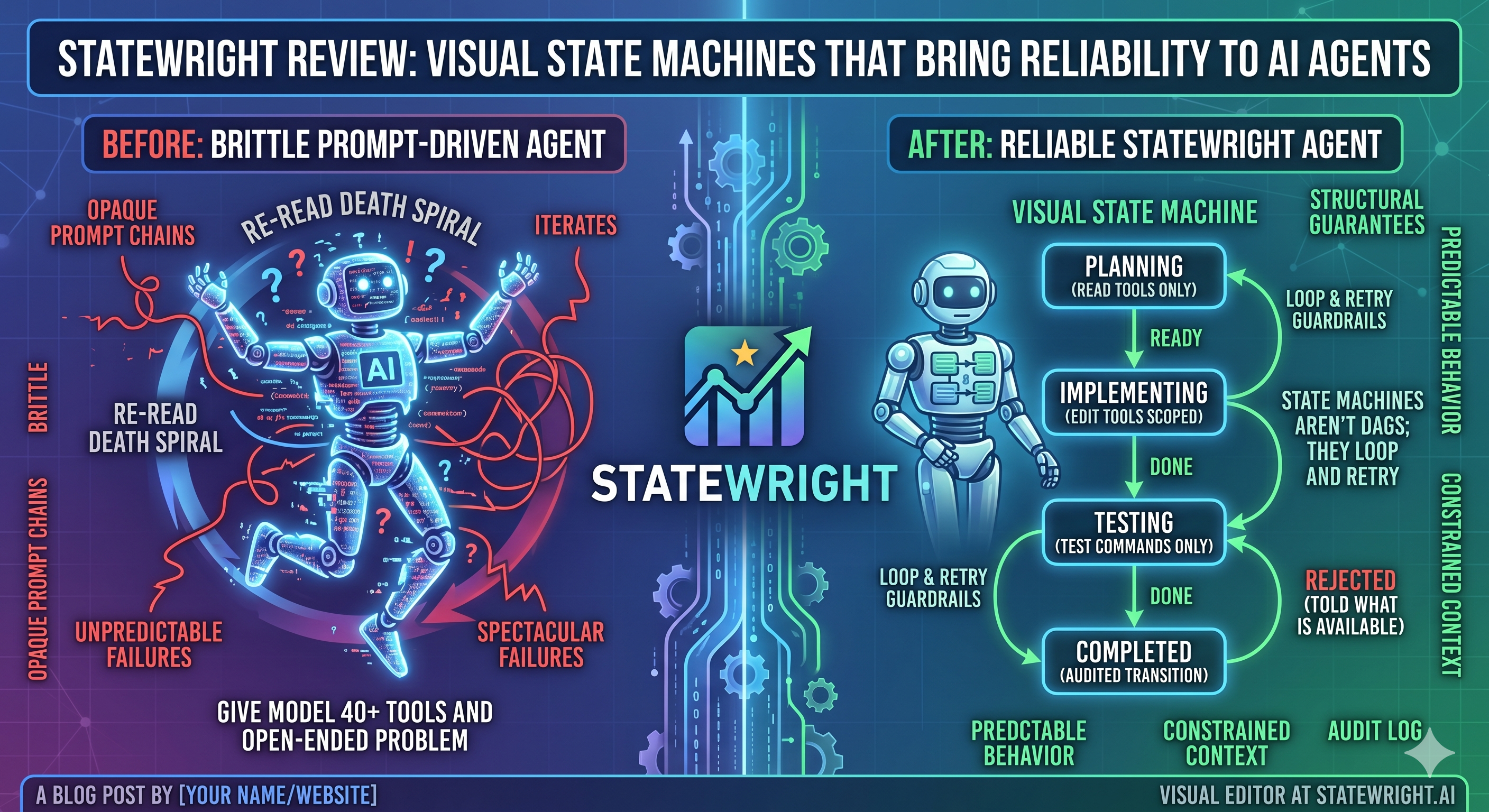
Why Visual State Machines Matter for AI Agents
Large language models (LLMs) excel at generating text, but they are notoriously unpredictable when stitched together into multi‑step workflows. A single ambiguous prompt can send an agent down a dead‑end, loop forever, or produce output that breaks downstream services. For developers building consumer‑facing apps—especially on a tight indie‑hacker budget—this volatility translates into lost users, higher support costs, and endless debugging sessions.
Enter Statewright, an open‑source framework that treats an AI agent as a visual state machine. By defining explicit states, transitions, and guard conditions, the agent’s logic becomes a graph you can see, edit, and test before it ever touches production. The result is a level of reliability that feels more like traditional software engineering than a wild LLM experiment.
“State machines give us a contract: given X input, we know exactly which state we’ll be in next.” – paraphrased from the Statewright README.
Core Concepts of Statewright
Statewright builds on three pillars:
- States – Named containers for a piece of logic (e.g.,
fetchUserProfile,summarizeFeedback). Each state can call an LLM, run custom code, or invoke an external API. - Transitions – Directed edges that define how the agent moves from one state to another based on conditions (e.g.,
if response.confidence > 0.8). - Visual Designer – A web‑based canvas where developers drag‑and‑drop nodes, connect them, and set guard expressions using a simple DSL.
The visual editor writes a JSON representation that the runtime consumes. This separation of design and execution mirrors what we see in low‑code platforms, but it stays firmly in the hands of developers—no proprietary lock‑in, and the output is fully version‑controlled.
How Statewright Works Under the Hood
- Definition Phase – You create a
.statewright.jsonfile (or use the UI) that declares states, their payload schemas, and transition rules. - Compilation Phase – The CLI compiles the JSON into a lightweight TypeScript/JavaScript runtime. The generated code includes type‑safe payload interfaces, making it easy to integrate with existing codebases.
- Execution Phase – At runtime, the engine loads the compiled graph, injects the initial context, and steps through states. Each step can be synchronous (pure function) or asynchronous (LLM call, HTTP request).
- Testing & Debugging – Because the flow is deterministic, you can write unit tests for individual states and simulate transitions with mock payloads. The UI also offers a live “step‑through” mode, showing the exact path taken for a given input.
Comparing Statewright to Other Agent Frameworks
| Feature | Statewright | LangChain | Auto‑GPT | ReAct (paper) |
|---|---|---|---|---|
| Visual editor | ✅ (built‑in canvas) | ❌ (code‑first) | ❌ | ❌ |
| Explicit state contracts | ✅ | ❌ (chain of calls) | ❌ | ❌ |
| Built‑in testing harness | ✅ | ✅ (via LangChain’s test utils) | ❌ | ❌ |
| Runtime size | < 200 KB (JS) | ~1 MB (Python) | ~500 KB (JS) | Conceptual only |
| Language support | TypeScript/JS | Python, JS | JS | N/A |
| Open‑source license | MIT | MIT | MIT | N/A |
While LangChain offers a richer ecosystem of connectors, it lacks a first‑class visual workflow. Auto‑GPT leans heavily on prompting heuristics, making reproducibility difficult. Statewright fills the niche where developers need visibility and testability without abandoning the flexibility of LLM calls.
Real‑World Use Cases
1. Customer‑Support Chatbot with Escalation Paths
A SaaS startup can model the support flow as states:
greetUserdetectIntentprovideAnswerescalateToHuman
Transitions are guarded by confidence scores from the LLM. If the confidence drops below 0.7, the graph automatically routes to escalateToHuman. The visual map makes it trivial for non‑technical product managers to audit the escalation logic.
2. Mobile App Onboarding Assistant
Indie developers often ship onboarding wizards that adapt to user input. Using Statewright, each step (e.g., askPermission, recommendFeatures) becomes a state. The graph can be exported as a JSON bundle and shipped with the mobile app, letting the client‑side logic stay deterministic even when the LLM model updates.
3. Automated Release Notes Generation
Connect a CI pipeline to a Statewright graph that pulls commit messages, prompts an LLM for summarization, and formats the output for App Store/Play Store listings. The deterministic flow ensures the same input always yields a compliant ASO description—something ScreenMint’s own publishing pipeline could consume directly.
Integrating Statewright with Existing SaaS Workflows
If you already use a platform like ScreenMint for screenshot generation and ASO metadata automation, you can embed a Statewright agent as a pre‑processor:
import { runGraph } from 'statewright-runtime';
import { generateScreenshots } from '@screenmint/api';

async function prepareRelease(context) {
  const enriched = await runGraph('release-pipeline.graph.json', context);
  // enriched now contains localized copy, feature highlights, etc.
  await generateScreenshots(enriched.assets);
}
The agent can pull data from your codebase, ask the LLM to craft persuasive copy, and hand the result off to ScreenMint’s publishing API—all within a single, auditable flow.
Pros and Cons
Pros
- Predictability – Explicit states eliminate “black‑box” LLM wandering.
- Testability – Unit tests for each node; visual step‑through debugging.
- Collaboration – Designers and product managers can view/edit the flow without touching code.
- Lightweight – Pure JS runtime, easy to bundle with web or mobile projects.
Cons
- Learning Curve – Developers need to think in terms of state machines, which can feel restrictive for simple one‑off prompts.
- Limited Ecosystem – Compared to LangChain, fewer pre‑built connectors; you may need to write custom adapters.
- UI Maturity – The visual editor is functional but lacks advanced features like version diffing.
Getting Started in 5 Minutes
- Clone the repo:
git clone https://github.com/statewright/statewright.git cd statewright npm install - Launch the visual editor:
npm run dev - Drag a LLM Call node, connect it to a Condition node, and export the graph.
- Run the generated runtime:
npx statewright run path/to/graph.json --input '{"userMessage":"Hi"}' - Observe the deterministic output in the console or UI.
Frequently Asked Questions
Q: Can Statewright be used with non‑LLM services? A: Absolutely. States can execute any async function—REST APIs, database queries, or even local file operations. The LLM is just one possible node type.
Q: How does Statewright handle token limits and cost control? A: Because each LLM call is an explicit node, you can attach guard logic that checks a running token counter and aborts or switches to a cheaper model when a budget threshold is reached.
Q: Is the visual editor suitable for production teams? A: The editor is open‑source and runs locally, so teams can host it behind their firewall. For larger organizations, exporting the JSON graph allows integration with existing CI/CD pipelines.
Q: Does Statewright support parallel execution? A: The core engine processes nodes sequentially, but you can model parallelism by spawning separate sub‑graphs and merging their results via a “join” state.
Q: What licensing considerations are there? A: Statewright is released under the MIT license, permitting commercial use, modification, and distribution without royalties.
Bottom Line
Statewright tackles one of the most painful aspects of LLM‑driven development: unpredictable control flow. By forcing agents into a visual state‑machine model, it gives developers the same safety nets they expect from traditional code—clear contracts, deterministic testing, and easy debugging. While the ecosystem isn’t as massive as LangChain, the trade‑off is a level of transparency that can dramatically reduce time‑to‑market for AI‑powered features.
For indie hackers and startup founders, the ability to hand‑off a reliable agent to a non‑technical teammate (or even automate parts of your ASO pipeline with ScreenMint) can be a decisive advantage. If you’re already wrestling with flaky LLM behavior, give Statewright a try; the visual approach may just be the missing piece in your AI toolkit.
Practical Takeaways
- Model any multi‑step AI workflow as a state machine to gain predictability.
- Use the built‑in visual editor for rapid prototyping and stakeholder review.
- Export the JSON graph and integrate it into existing CI/CD pipelines, including SaaS tools like ScreenMint.
- Write unit tests for each state to catch prompt regressions early.
- Monitor token usage within guard conditions to keep LLM costs under control.